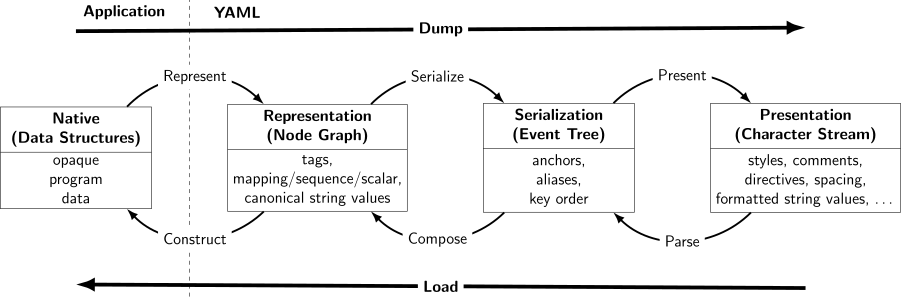
The diagram below depicts the standard layers of a YAML 1.2 processor. This module covers the upper Native and Representation layers, whereas the Data.YAML.Event and Data.YAML.Token modules provide access to the lower Serialization and Presentation layers respectively.
This section contains basic information on the different ways to work with YAML data using this library.
Decoding/Loading YAML document
We address the process of loading data from a YAML document as decoding.
Let's assume we want to decode (i.e. load) a simple YAML document
- name: Erik Weisz
  age: 52
  magic: True
- name: Mina Crandon
  age: 53
into a native Haskell data structure of type [Person], i.e. a list of Person records.
The code below shows how to manually define a Person record type together with a FromYAML instance:
{-# LANGUAGE OverloadedStrings #-}

import Data.YAML

data Person = Person
    { name  :: Text
    , age   :: Int
    , magic :: Bool
    } deriving Show

instance FromYAML Person where
   parseYAML = withMap "Person" $ \m -> Person
       <$> m .: "name"
       <*> m .: "age"
       <*> m .:? "magic" .!= False
Sometimes we want to work with YAML data directly, without first converting it to a custom data type.
We can easily do that by using the Node type, which is an instance of FromYAML, is used to represent an arbitrary YAML AST (abstract syntax tree). For example,
The type parameter Pos is used to indicate the position of each YAML Node in the document.
So using the Node type we can easily decode any YAML document.
Pretty-printing source locations
Syntax errors or even conversion errors are reported with a source location, e.g.
Example1 expression
>>> decode "- name: Erik Weisz\n age: 52\n magic: True\n- name: Mina Crandon\n age: young" :: Either (Pos,String) [[Person]]Left (Pos {posByteOffset = 71, posCharOffset = 71, posLine = 5, posColumn = 7},"expected !!int instead of !!str")
While accurate this isn't a very convenient error representation. Instead we can use the prettyPosWithSource helper function to create more convenient error report like so
readPersons :: FilePath -> IO [Person]
readPersons fname = do
   raw <- BS.L.readFile fname
   case decode1 raw of
     Left (loc,emsg) -> do
       hPutStrLn stderr (fname ++ ":" ++ prettyPosWithSource loc raw " error" ++ emsg)
       pure []
     Right persons -> pure persons
which will then print errors in a common form such as
people.yaml:5:7: error
   |
 5 |   age: young
   |        ^
expected !!int instead of !!str
Encoding/dumping
We address the process of dumping information from a Haskell-data type(s) to a YAML document(s) as encoding.
Suppose we want to encode a Haskell-data type Person
data Person = Person
    { name :: Text
    , age  :: Int
    } deriving Show
To encode data, we need to define a ToYAML instance.
instance ToYAML Person where
-- this generates a NodetoYAML (Person n a) = mapping [ "name" .= n, "age" .= a]
Decode YAML document(s) using the YAML 1.2 Core schema
Each document contained in the YAML stream produce one element of
the response list. Here's an example of decoding two concatenated
YAML documents:
Example1 expression
>>> decode "Foo\n---\nBar" :: Either (Pos,String) [Text]Right ["Foo","Bar"]
Note that an empty stream doesn't contain any (non-comment)
document nodes, and therefore results in an empty result list:
Example1 expression
>>> decode "# just a comment" :: Either (Pos,String) [Text]Right []
decode uses the same settings as decodeNode for tag-resolving. If
you need a different custom parsing configuration, you need to
combine parseEither and decodeNode' yourself.
The decode as well as the decodeNode functions supports
decoding from YAML streams using the UTF-8, UTF-16 (LE or BE), or
UTF-32 (LE or BE) encoding (which is auto-detected).
NOTE: fail doesn't convey proper position information unless used within the with*-style helpers; consequently it's recommended to use failAtNode when not covered by the location scope of a with*-style combinator.
Retrieve optional value in Mapping indexed by a !!strText key.
Nothing is returned if the key is missing or points to a tag:yaml.org,2002:null node.
This combinator only fails if the key exists but cannot be converted to the required type.
Alternatively, if you only need a single YAML document in a YAML stream you might want to use the convenience function encode1; or, if you need more control over the encoding, see encodeNode'.
NOTE: if posCharOffset is negative the Pos value doesn't refer to a proper location; this may be emitted in corner cases when no proper location can be inferred.
Pretty prints a Pos together with the line the Pos refers and the column position.
The input ByteString must be the same that was passed to the
YAML decoding function that produced the Pos value. The String
argument is inserted right after the line:column: in the
first line. The pretty-printed position result String will be
terminated by a trailing newline.